【ES】启动失败报max file descriptorsfor elasticsearch process is too low
问题版本:
tar包安装后报错,其他版本rpm也可能出现这种情况。
问题现象/报错:
ES7.16.1TAR包安装后启动es失败,报错内容:
ERROR: [1] bootstrap checks failed. You must address the points described in the following [1] lines before starting Elasticsearch.
bootstrap check failure [1] of [1]: max file descriptors [60000] for elasticsearch process is too low, increase to at least [65535]
ERROR: Elasticsearch did not exit normally – check the logs at /home/songxk/esdata/logs/cluster.log
错误:[1]引导检查失败。在开始Elasticsearch之前,您必须解决以下[1]行中描述的问题。
[1]中的引导检查失败[1]:elasticsearch进程的最大文件描述符[60000]太低,至少增加到[65535]
错误:Elasticsearch未正常退出-检查/home/songxk/esdata/logs/cluster中的日志。

排查思路/解决方案:
elasticsearch进程的最大文件句柄数太小,必须设置到65535以上,否则无法启动。
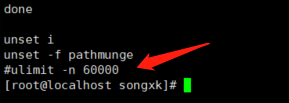
我们安装部署时会调整/etc/security/limits.conf中的配置nofile,一般不会出现这种情况,但个别服务器中/etc/profile文件里会有一条配置limit的命令(如下图),每次用户登录都会执行这个文件,导致刷新了limit的值,可以在/etc/profile中注释掉这一条,或者吧值修改为65535以上的值(这个文件影响所有用户的环境变量,一般这个值客户没有特殊要求可以改)。再启动ES就可以了。